Some actions need to know, with certainty, who is taking them: approving a large payment, signing a contract, opening a patient's record, changing who can administer a system. Privasys Wallet gives these workflows a strong answer. The holder's identity rests on their passport or national ID card, whose chip is signed by the issuing country and checked in an attested enclave that keeps nothing; the verified attributes then live on the holder's phone, and a service receives a proof of exactly what it asked for and nothing more. We set out that model in June, in Prove It Without Giving It Away.
The model holds only if people can complete the first step: reading the chip in their document, alone, with a phone. That step asks the most of the holder, and it is what the latest wallet, version 1.4.47, rebuilds.
Why reading a chip with a phone is hard
Border gates have read passport chips for close to twenty years, and they make it look effortless. A gate has two advantages a phone does not. Its reader is a flat antenna the size of an open passport, which powers the chip wherever it sits in the booklet. And an officer, or at least a diagram on the machine, shows the traveller what to do.
A phone has neither. Three things stand between the holder and a successful read.
The chip is locked. Since the first electronic passports, chips have protected their contents with Basic Access Control, and more recently with its successor, PACE. Both derive the key that opens the chip from the document number, the date of birth and the expiry date printed on the photo page. The design is deliberate: whoever reads the chip must have seen the document open, so a passport cannot be read through a bag. For us it means the wallet must first read those three values, exactly, from the two lines of letters and chevrons at the bottom of the photo page, the machine-readable zone. One wrong character and the chip refuses the key. In the typeface those lines are printed in, an O and a 0, an I and a 1, a B and an 8 are close enough to fool optical recognition on a phone camera.
The chip is somewhere in the booklet. ICAO Doc 9303, the standard every passport follows, specifies what the chip holds and how to talk to it, and leaves its physical location to the issuing country. Some countries put it in the back cover, some in the front cover, some in the plastic photo page, some in a stiff page of its own. The United States shields the cover so that the booklet must be opened. Countries also move it when they redesign: Austria's passports issued from December 2023 carry it in the front cover, the earlier ones in the back.
The phone's reader is small. A phone's NFC antenna covers a few square centimetres and reaches a few centimetres. On an iPhone it sits along the top edge; on most Android phones it sits in the middle of the back. The phone has to be laid on the right part of the right page, and held still for the few seconds the read takes.
Each of these is manageable on its own. Together they make the difference between a check that works in two minutes and one that people give up on. Our own earlier versions asked the holder to photograph the whole page, sent the photo to the enclave to read the lines, then said "hold your passport to the phone" without saying where.
What we built
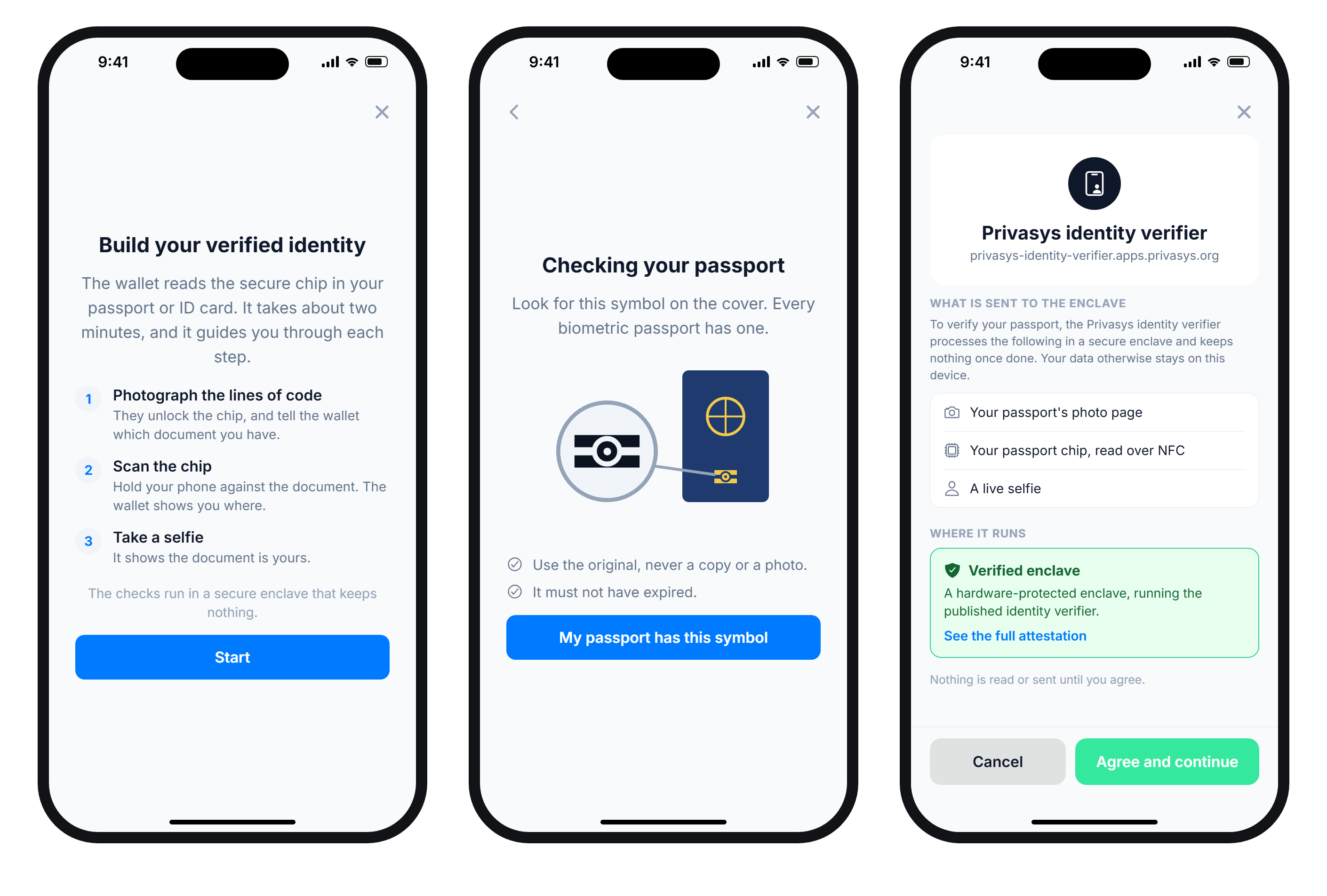
Before anything is read: the overview, the chip symbol, and one approval.
One overview, one approval
The check opens with what is about to happen and why: photograph the lines of code, which unlock the chip and tell the wallet which document you have; scan the chip; take a selfie. The holder then picks a passport or an ID card and confirms the document carries the chip symbol, the small camera-like logo printed on the cover of every biometric passport.
There is then a single approval. It lists what is sent to the enclave (the photo page, the chip's contents and a live selfie) and, under it, where the check runs. While the screen is on show, the wallet verifies the enclave's attestation: the hardware-signed proof that the published identity verifier is what is running. The holder can open the full attestation, and cannot agree until it has been verified. Earlier versions asked for these as two separate approvals, which read as the same question twice.
The camera reads the lines on its own
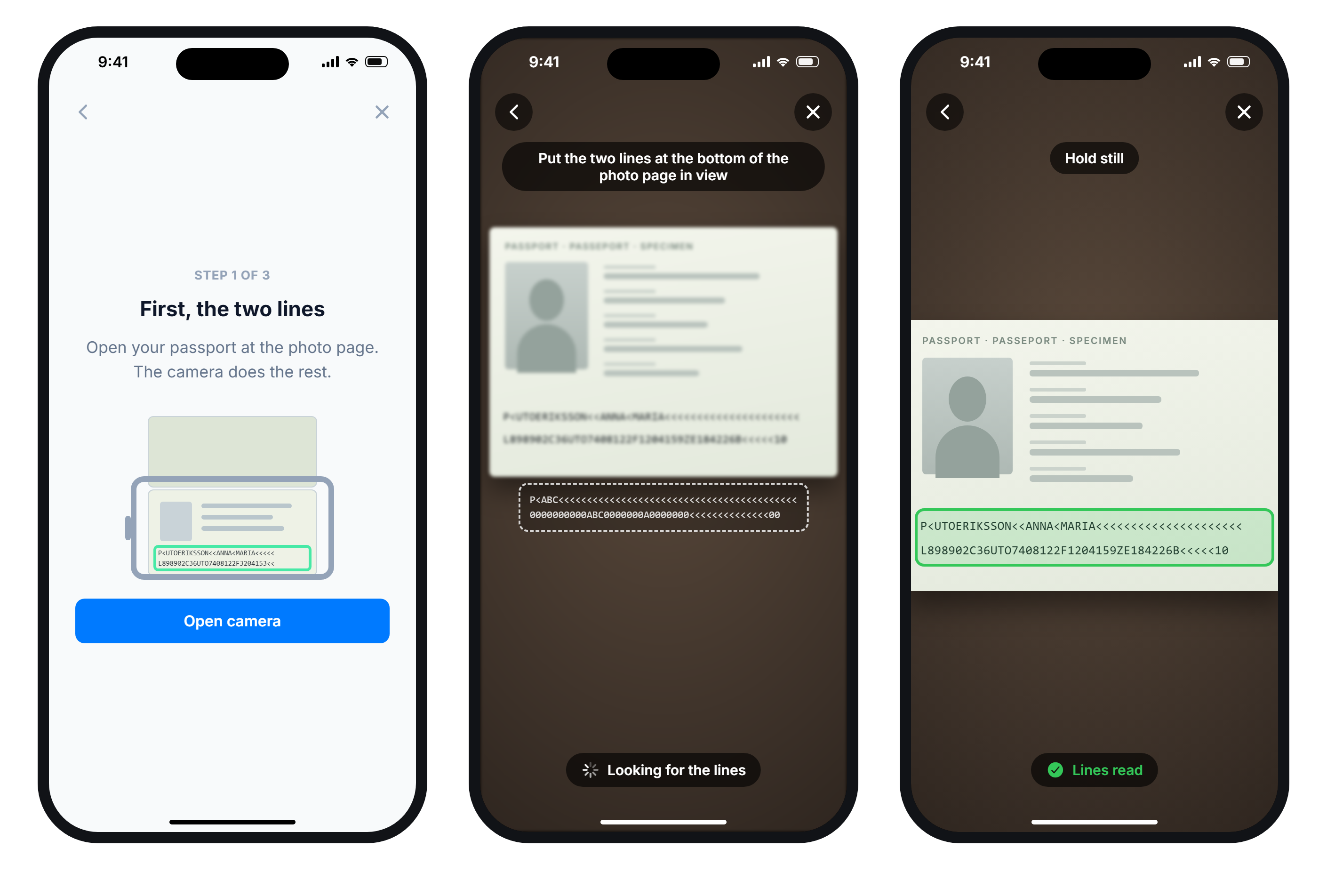
The camera shows a sample of the lines, then boxes the real ones and turns green once they check out. The document is ICAO's fictional specimen.
The camera now reads the two lines itself, frame by frame, with the text recognition built into the phone: Apple's Vision framework on iOS and Google's ML Kit on Android. Until it finds them, the screen shows a dashed slot holding a sample of the lines, which shows what to look for more plainly than a sentence. Once it sees them, it draws a box round them wherever they are in view, and the box turns green when they are read.
"Read" means more than recognised. Every field in the zone carries a check digit, and the wallet accepts the lines only when the document number, the date of birth and the expiry date all match theirs. A misread 0 for an O fails its check digit, and the camera simply keeps looking at the next frame. If the phone sees the lines but cannot get them to check out within two and a half seconds, it sends that frame to the enclave, which reads the zone itself, as every earlier version did. If the chip still refuses the key, the wallet asks the enclave to read the same frame again before asking the holder to retake anything.
The wallet shows where the chip is
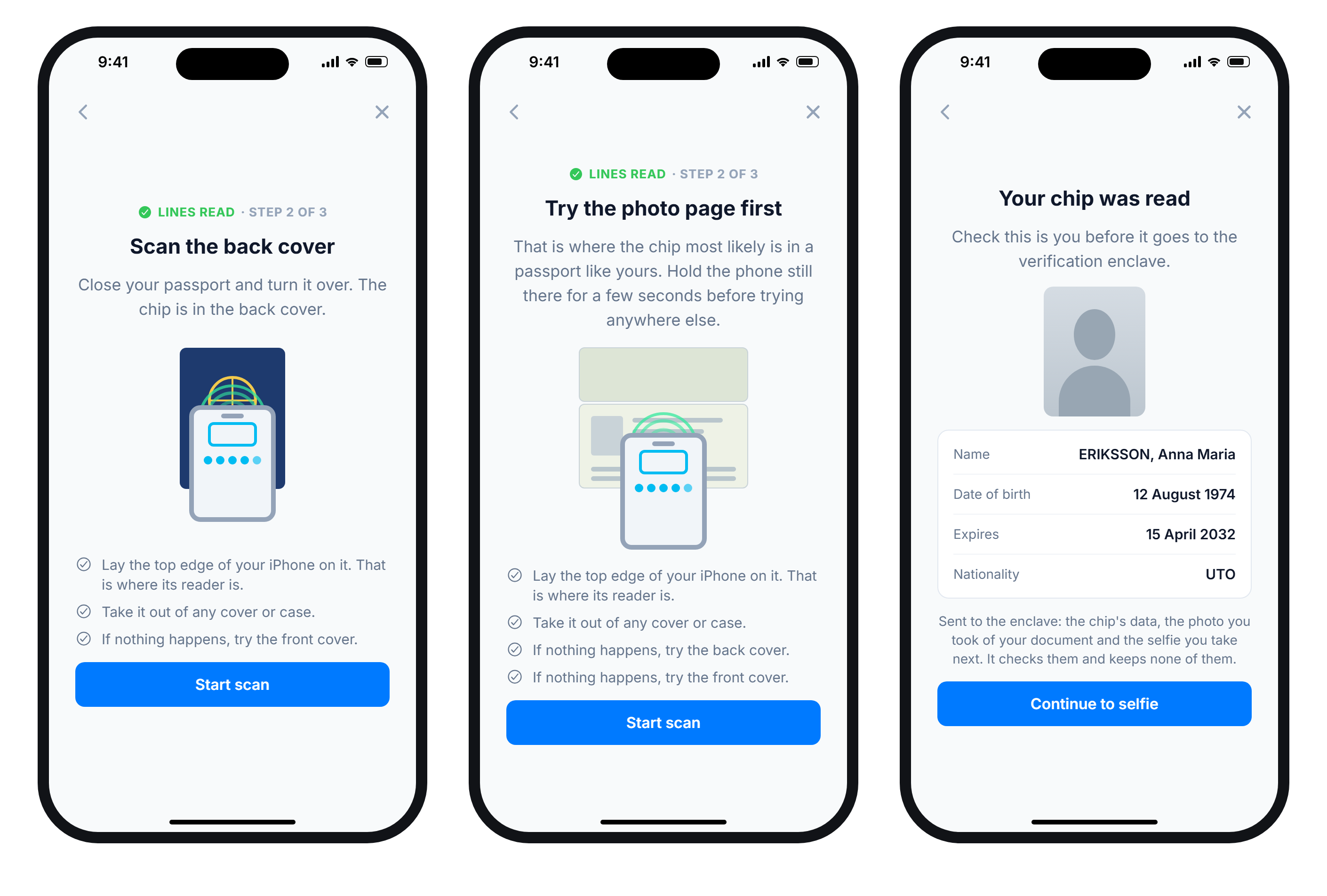
Where to lay the phone, stated where a source states it and offered where it is a lead, then what the chip said before anything is sent.
The lines that unlock the chip also name the issuing country and the expiry date. From those the wallet works out which design the passport is likely to be, and where its chip is. A French passport is told to scan the back cover, with the front cover as the next place to try. The drawing shows the phone resting where its reader is: top edge on the document for an iPhone, middle for most Android phones.
No public list of chip positions existed, for the reason given above: the gates that read passports never needed one. So we started one, and, like everything we build, it is open source on GitHub. It covers 27 countries so far, each entry backed by a published source, and we welcome contributions for the countries it does not yet cover.
Where a source states the position for a passport of that age, the wallet says it as a fact. Where it only has a lead, for example a passport newer than the latest documented design, it offers it as one, "Try the photo page first", followed by the other places in order. The list is signed and served from privasys.id, so a correction reaches installed wallets without an app update.
The holder sees what the chip said
After the read, and before anything is sent, the wallet shows what the chip contains: the photo, the name, the dates and the nationality. The holder checks it is them and then takes the selfie. The enclave receives the chip's contents, the frame showing the lines and the selfie. It verifies the chip's signature against the issuing country's certificates, matches the selfie to the chip's photo, returns the verified attributes to the wallet, and keeps none of it. The holder then chooses which of those attributes to keep.
Using the identity at sign-in
Once verified, the attributes are used the way every other attribute in the wallet is: an application asks for them at sign-in, and the holder decides. As with any sign-in, the wallet first checks the application's enclave, then shows what it asks for.
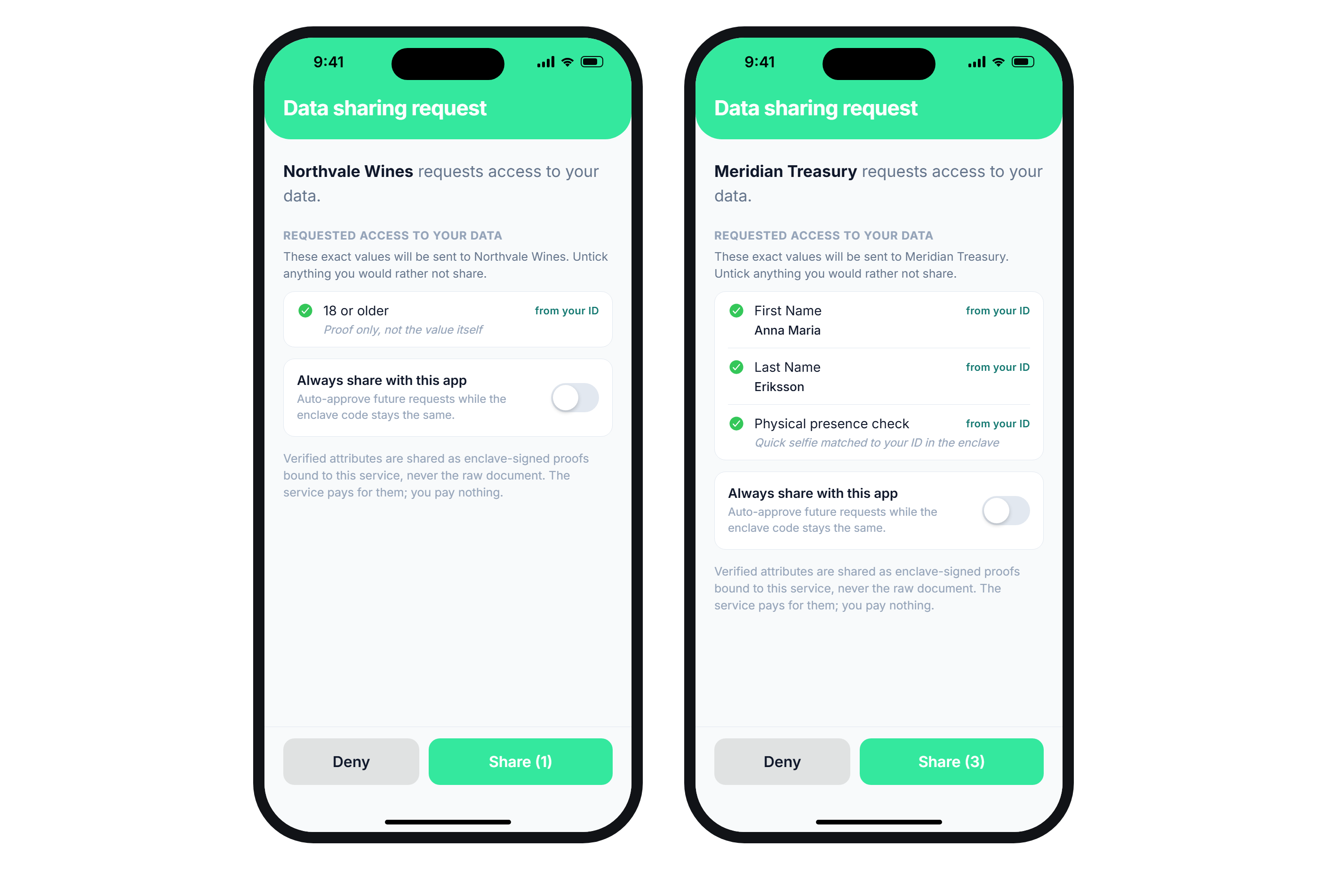
Two requests for attributes from the ID: a proof of age, and a name with a presence check before a sensitive action. Both applications are fictional.
An application that sells wine only needs to know that the holder is an adult. It asks for "18 or older", and the wallet marks the row as a proof only: the application learns yes, and never sees the date of birth, which stays in the wallet. An application approving a payment needs more. It can ask for the holder's name as it appears on their ID, and for a physical presence check: a quick selfie, matched in the enclave to the photo from the chip, which shows that the person holding the phone is the person the identity belongs to at the moment of the action.
The wallet marks each attribute that comes from the ID. The application receives a signed proof of it, never the document. Each proof is made for that one application, so it is useless anywhere else.
In short
A strong identity is only useful once people have one. Setting it up from a phone is now much easier, and on Privasys the entire process is transparent and verifiable. The wallet's main promise holds: the holder is always in control of which attributes a third-party application receives at sign-in, and some attributes now rest on a government-verified identity.
Privasys Wallet is available on the App Store and Google Play. Its source is open under the AGPL-3.0 licence at github.com/Privasys/identity-platform, and the chip-placement list, with the sources for every entry, is in its chip-placement folder.